
 AeroSim Docs
Moment Coefficient
The Moment Coefficient, \(C_M\), is a dimensionless parameter that provides a generalized representation of the resultant moment experienced by an object within a fluid flow. It offers a means to evaluate the cumulative effect of pressure coefficients, \(c_p\) across different regions of an object’s surface and how these pressures translate into aerodynamic moment forces.
\(C_M\) is a fundamental tool for torsional effects for the design and analysis of aerodynamic components.
Definition
Similarly to the force coefficient, this coefficient is defined as a resulting moment coefficient of a body.
It is defined as a sum of the resulting moment for each triangle of each surface of the body:
The position vector \(r_o\) is defined for each triangle, from a common arbitrary points \(o\). One can also define it for each axis direction:
We define the nominal volume (\(V_{nom}\)) as a user input. This is done to let the user define how they want to calculate its value. For example, considering a rectangular tall building:
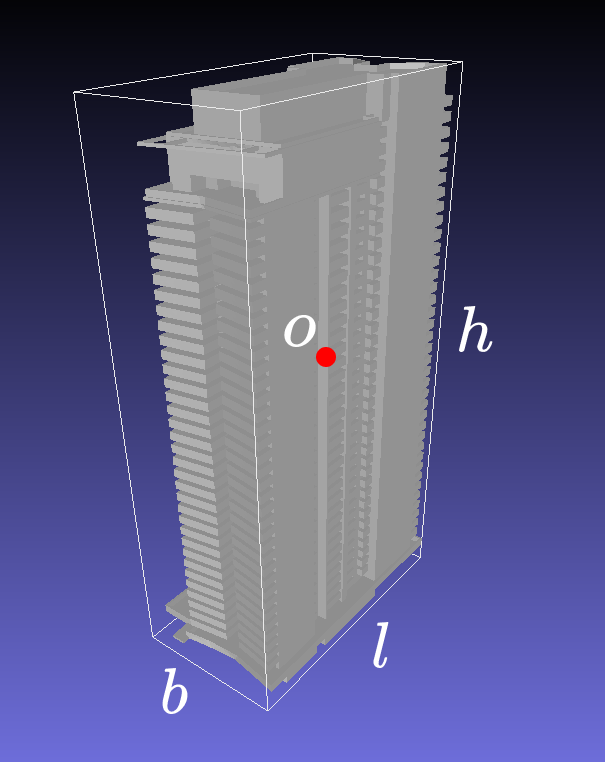
The nominal volume could be calculated with:
Use Case
A common application of the moment coefficient requires sectioning the body in different sub-bodies. To do so, the same logic applied to the force coefficient is used to determine the respective sub-body of each of the body’s triangles. If its center lies inside the sub-body volume, then it belongs to it.
The result is a sectionated body in different sub-bodies for each interval. When sectioning the body, the respective nominal volume should be the same as the sub-body nominal volume.
Note
Check out the concepts section for more information about surface, body and sub-body definitions.
Like the other coefficients, we can apply statistical analysis to the moment coefficient.
By definition, the moment coefficient is a property of a body.
It is used for primary and secondary structures design, such as canopies. It can also be used for evaluating the resultant wind torsional effect over a building or the building paviments. It can be seen as the resulting torsion effect of the wind induced stress over a body.
Lever origin
The moment is taken about a single lever_origin point, configured on
the moment_contribution op:
- id: with_moments
  kind: moment_contribution
  source: with_forces
  lever_origin: [0.0, 10.0, 10.0]
  nominal_area: 100.0
  nominal_volume: 10.0
  directions: [x, y, z]
To scan several candidate centers (for instance a worst-case overturning
moment about each footprint corner), run the template once per
lever_origin and keep the outputs side by side – each run is an
independent pipeline.
Artifacts
The Cm template reads a Cp time series (kind: surface, produced by
the Cp template) and composes mesh_attach -> body_grouping ->
force_contribution -> moment_contribution ->
field_series_for_groups. The moment op reuses the cf_<dir> fields
produced upstream. The output is one GroupsDataSource per direction
(cm_x / cm_y / cm_z) with one row per body.
Usage
Run the shipped template:
cfdmod run fixtures/tests/pressure/templates/cm.yaml
or from Python:
from cfdmod import load_template, run_template, XdmfH5Storage

bindings = run_template(load_template("cm.yaml"), storage=XdmfH5Storage(root="."))
cm_z = bindings["cm_z"]          # GroupsDataSource, one row per body
The calculate_Cm.ipynb notebook walks through this template step by step.
The Sphinx-bundled calculate_Cm.ipynb notebook
covers a single body with a fixed lever origin; for the multi-region
region_bbox_corners_xy scan and per-container overturning moments,
see examples/container_pack/process_container_pack.ipynb in the repository.
Data format
Note
The rule for determining the region_idx is based on the region index and the body name. Input mesh can have multiple bodies, and each of them can be applied a specific zoning/region rule. Because of that, region_idx has to be composed by the zoning region index joined by “-” and the body name. This also guarantee that even if different bodies lie on the same region, the interpreted region for each of them will be different
Note
For more information about the normalized time scale (\(t^*\)), check the Time Normalization section
time_idx/region_idx |
Normalized time (\(t^*\)) |
0-Body1 |
1-Body1 |
0-Body2 |
|---|---|---|---|---|
0 |
10000 |
1.25 |
1.15 |
-1.1 |
1 |
11000 |
1.5 |
0.9 |
-1.15 |
time_idx/region_idx |
Normalized time (\(t^*\)) |
0-Body1 |
1-Body1 |
0-Body2 |
|---|---|---|---|---|
0 |
10000 |
1.25 |
1.15 |
-1.1 |
1 |
11000 |
1.5 |
0.9 |
-1.15 |
time_idx/region_idx |
Normalized time (\(t^*\)) |
0-Body1 |
1-Body1 |
0-Body2 |
|---|---|---|---|---|
0 |
10000 |
1.25 |
1.15 |
-1.1 |
1 |
11000 |
1.5 |
0.9 |
-1.15 |
region_idx |
max |
min |
mean |
std |
skewness |
kurtosis |
|---|---|---|---|---|---|---|
0-Body1 |
1.25 |
0.9 |
1.1 |
0.2 |
0.1 |
0.15 |
1-Body1 |
1.15 |
0.95 |
1.13 |
0.19 |
0.11 |
0.13 |
region_idx |
max |
min |
mean |
std |
skewness |
kurtosis |
|---|---|---|---|---|---|---|
0-Body1 |
1.25 |
0.9 |
1.1 |
0.2 |
0.1 |
0.15 |
1-Body1 |
1.15 |
0.95 |
1.13 |
0.19 |
0.11 |
0.13 |
region_idx |
max |
min |
mean |
std |
skewness |
kurtosis |
|---|---|---|---|---|---|---|
0-Body1 |
1.25 |
0.9 |
1.1 |
0.2 |
0.1 |
0.15 |
1-Body1 |
1.15 |
0.95 |
1.13 |
0.19 |
0.11 |
0.13 |
region_idx |
point_idx |
|---|---|
0-Body1 |
0 |
1-Body1 |
1 |
region_idx |
x_min |
x_max |
y_min |
y_max |
z_min |
z_max |
Lx |
Ly |
Lz |
|---|---|---|---|---|---|---|---|---|---|
0-Body1 |
0 |
100 |
0 |
50 |
0 |
20 |
0.5 |
0.8 |
0.1 |
1-Body1 |
100 |
200 |
0 |
50 |
0 |
20 |
0.5 |
0.8 |
0.2 |