
 AeroSim Docs
Geometry Representation with IBM
AeroSim represents solid bodies in the computational domain using the Immersed Boundary Method (IBM). Instead of generating a body-fitted mesh around each geometry, IBM imposes the presence of solid surfaces by applying correction forces on the fluid nodes near the body. This allows complex geometries to be handled on a fixed Cartesian grid with no volume meshing step.
See also
For details on how STL surfaces are refined and converted into Lagrangian points, see Geometry Discretization.
How IBM works
The IBM superimposes a set of Lagrangian points (placed on the geometry surface) onto the Eulerian fluid grid (the LBM lattice). At each time step, two operations enforce the no-slip boundary condition:
Combine (interpolation): the fluid velocity at each Lagrangian point is interpolated from the surrounding fluid nodes.
Force computation: a correction force is calculated to drive the interpolated velocity toward the target wall velocity (zero for stationary bodies).
Spread: the correction force is distributed back to the surrounding fluid nodes, modifying the local flow field to account for the presence of the solid body.
Both the combine and spread operations use a smoothed delta function with finite support. With the default 2-point kernel, each Lagrangian point exchanges information with fluid nodes within approximately 1.5 lattice cells of the surface.
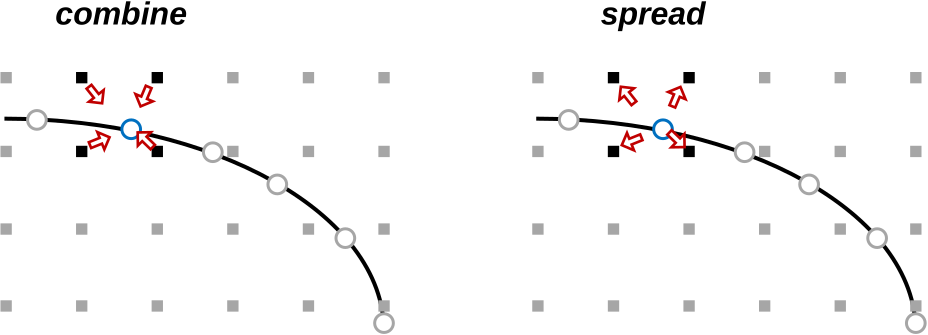
Combine and spread operations. The fluid velocity at black grid nodes is interpolated onto blue Lagrangian points (combine), then the correction force computed at each Lagrangian point is spread back to the surrounding fluid nodes.
Note
The force computation is iterative within each time step. In most cases a single iteration is sufficient, but high-Reynolds-number LES simulations may use additional iterations to prevent fluid penetration through the surface.
The diffusive layer
The spread operation distributes forces over a thin band of fluid nodes around the body surface. This band is called the diffusive layer (or diffuse interface). Within it, flow quantities - velocity, pressure, and density - are directly influenced by the IBM forcing and do not represent purely physical values.
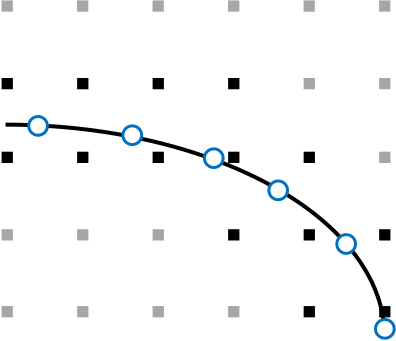
The diffusive layer around an immersed body. Black squares are the fluid nodes affected by the force spreading, blue circles are the Lagrangian points on the body surface, and grey squares are unaffected fluid nodes.
The thickness of the diffusive layer is determined by the support of the smoothed delta function:
3-point kernel (default): ~1.5 lattice cells from the surface
4-point kernel: ~2.0 lattice cells from the surface
Important
Any measurement or data extraction performed inside the diffusive layer will contain numerical artefact from the IBM forcing. This applies to pressure, velocity, and derived quantities such as force coefficients.
Practical implications
Pressure measurement
Pressure sampled within the diffusive layer does not represent the true surface pressure. To obtain physically meaningful values, sampling points must be displaced outward along the surface normal to a distance beyond the diffusive layer.
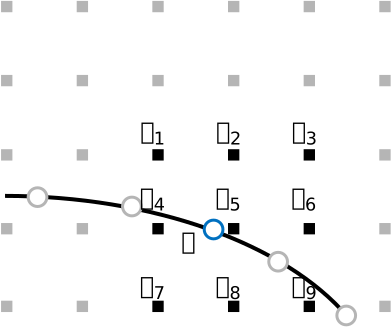
An IBM Lagrangian point (blue, \(\mathbf{X}\)) and its surrounding grid nodes. Only external fluid nodes (outside the body) carry physically meaningful pressure values. Internal nodes must be disregarded when measuring surface pressure.
In AeroSim, this is controlled by the normal_offset parameter in body exports. A value of normal_offset = 2 * body_ref (where body_ref is the body’s mesh resolution in metres) places the probes approximately 2 lattice cells from the surface, outside the diffusive layer.
See also
For a complete guide on setting up pressure exports and computing \(c_p\), see Pressure Coefficient Measurement.
Mesh refinement near bodies
The diffusive layer must be fully covered by the finest refinement level assigned to the body. When configuring the refinement zone around a geometry, the inner thickness should be set to a small negative value (for example, -2 m) so that the refinement extends slightly inside the body surface. This ensures that no part of the diffusive layer falls on a coarser grid level, which would degrade the accuracy of the boundary condition.
Note
When a wall model is enabled, the IBM operates differently. Instead of enforcing the no-slip condition directly at the surface, the wall model places a reference point at a distance of at least \(3\Delta x\) from the wall - outside the diffusive layer - and uses a wall function (such as the equilibrium log-law) to compute a corrected velocity closer to the surface. For details, see the Wall Model - IBM section in the solver theory documentation.
See also
Immersed Boundary Method - Theory - mathematical formulation of the combine/spread operations and the smoothed delta function
Geometry Discretization - STL format, triangle refinement, and IBM point placement
Geometry Preparation - triangle quality requirements for IBM
Pressure Coefficient Measurement - practical guide for measuring \(c_p\) on body surfaces